Vector vs. Raster: When to Use SVG, PNG, or JPEG
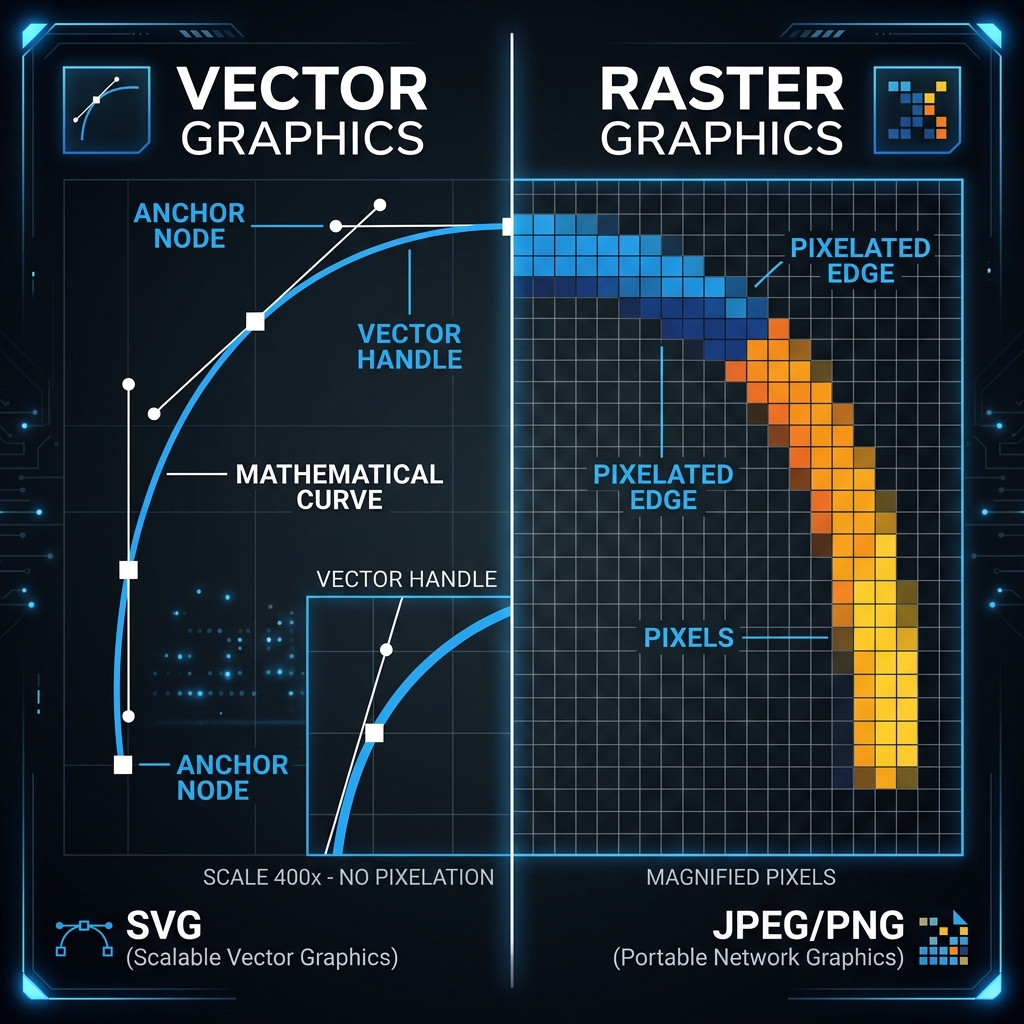
All digital images fall into one of two categories: vector or raster graphics. Using the wrong type for your website assets can result in blurry logos, slow loading speeds, and visual distortion. This guide explains the key technical differences between vector (SVG) and raster (PNG/JPEG) graphics and when to use each.
👉 Try our SVG to PNG converter — free, no upload, works in your browser instantly.
1. Vector Graphics (SVG)
Vector graphics are built using mathematical equations that define points, lines, shapes, and curves. Because they are not grid-based, they can be scaled infinitely without any loss in clarity. SVG (Scalable Vector Graphics) is the standard vector format for the web. It is best suited for logos, icons, UI elements, and clean charts.
2. Raster Graphics (JPEG and PNG)
Raster graphics are composed of a fixed grid of individual pixels. Scaling them up introduces pixelation and blur. They are best suited for photographic content where fine details and complex color variations are required.
3. SVG Vectors: XML Code Optimization
SVGs are mathematical coordinate shapes defined in XML code. Stripping editor namespaces, comments, and coordinate decimals from SVG files reduces vector sizes by up to 60%. This minification leads to faster DOM rendering speeds.
Minified SVGs load faster because they contain less code. Clean XML structures prevent parsing delays, letting browsers render vectors instantly. Developers can automate this minification process, ensuring fast vector performance. XML elements can also be optimized by combining path details. By merging separate path definitions into unified coordinates, you simplify the XML structure. Additionally, defining styles inline instead of repeating them keeps file sizes small, improving layout load times.
By stripping redundant software metadata (e.g., Illustrator template tags or Inkscape flags), vector files become highly lightweight. Minifying decimal numbers (such as from 4.12345 to 4.1) further reduces coordinate strings without affecting shape curves, yielding major payload savings.
4. Rasterizing SVGs to Transparent PNGs at High Scale
Rasterizing SVGs to transparent PNGs is necessary for platforms that do not support vector formats. Our local converter renders vector paths on canvas at any scale, ensuring sharp details even at ultra-high resolutions.
Rasterizing vector files lets you save assets as universal PNGs. Because vectors scale without losing detail, you can export PNGs at high resolutions without blur, making them ideal for branding files and presentation assets, maintaining design consistency across systems.
This scaling flexibility is critical for logo print templates. By loading the source SVG and defining target widths (such as 4000px), you export highly defined PNGs with transparent backgrounds. This makes it easy to integrate brand vectors in offline media layouts.
5. File Size and Memory Optimization Strategies
Use vectors for logos and simple icons to keep sizes small. For complex photos, convert files to WebP. This client-side approach ensures files are optimized locally in browser memory without server uploads.
Selecting the right image type keeps site layouts fast. While SVGs are ideal for icons, raster formats are necessary for detailed photographs. Using WebP formats for photos and minified SVGs for icons maximizes site performance, keeping DOM rendering weight under control.
6. The Security Architecture of Local Client-Side Processing
Unlike traditional online image utilities that require uploading private assets to cloud servers, TinyImagefy performs all file calculations directly inside the user's browser runtime memory. By utilizing modern web APIs such as the HTML5 Canvas API, the File Reader API, and WebAssembly (WASM) modules, the website parses binary image streams locally. This serverless execution model eliminates transmission overhead, making it impossible for malicious entities or database leaks to compromise your personal documents, photography portfolio, or sensitive ID scans. All operations execute strictly within the local browser sandbox, providing enterprise-grade security for everyday workflows.
7. Compliance and Regulatory Benefits of Serverless Tools
Processing media assets locally aligns perfectly with strict international data protection regulations, including the General Data Protection Regulation (GDPR) in Europe and the California Consumer Privacy Act (CCPA) in the United States. Since no image files, EXIF headers, or metadata profiles are uploaded, stored, or processed on remote server arrays, TinyImagefy acts as a passive container. This means businesses, developers, and photographers can sanitize their visual assets, strip GPS coordinates, or crop passport photos without worrying about data processing agreements or regulatory compliance issues. Keeping your files offline is the ultimate way to maintain data sovereignty in a hyper-connected digital landscape.
Frequently Asked Questions
Yes — 100% free, unlimited, no signup. All tools work forever at no cost.
Never. Everything runs in your browser. Your files never leave your device.
JPG, PNG, WebP, AVIF, HEIC, BMP, GIF, SVG, TIFF, and PDF — across 30+ tools.
Yes — works perfectly on iPhone, Android, tablet, and desktop browsers.
The TinyImagefy team builds privacy-first browser tools for image processing. All tools run 100% locally — no uploads, no servers, no tracking. We've helped millions of users compress, convert, and edit images safely since 2024.
About Us →