What is AVIF? The Next-Generation Image Format Explained
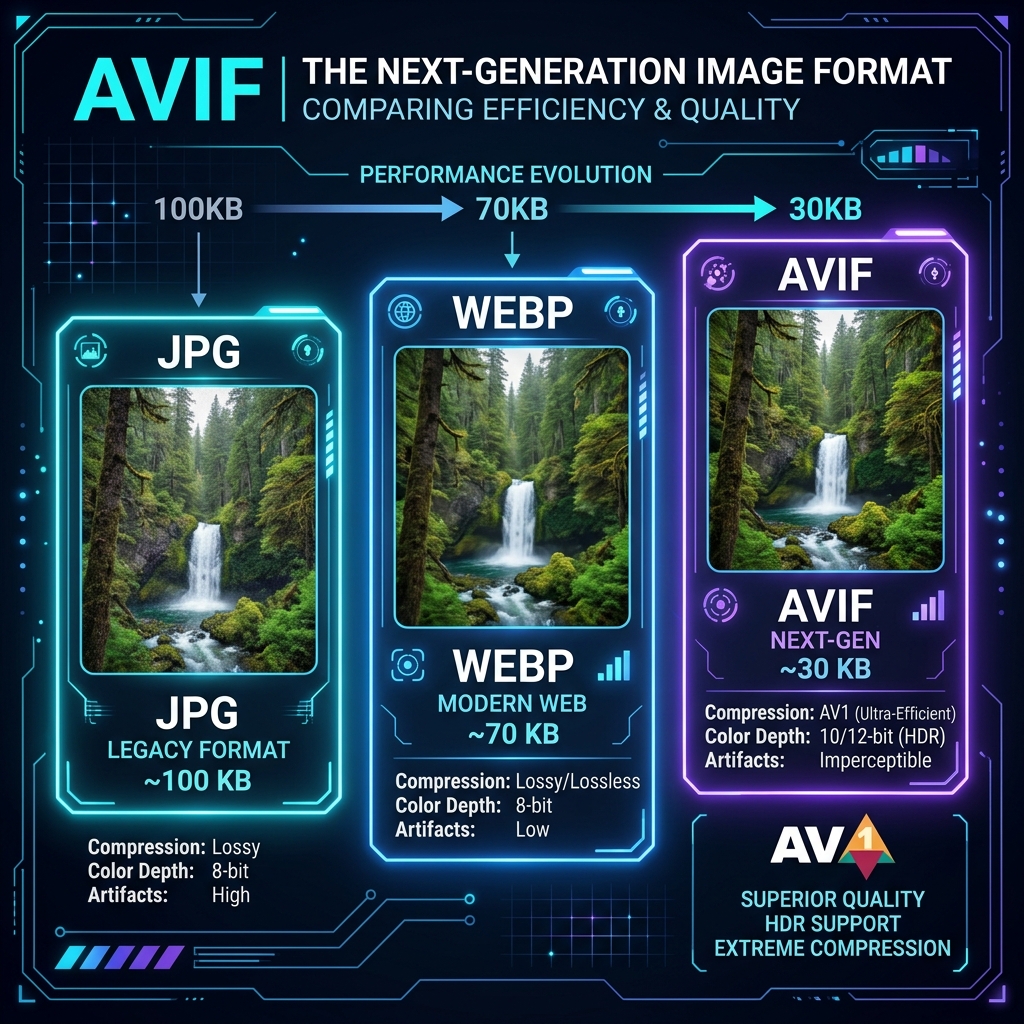
In the constant quest for a faster, lighter web, image compression stands out as a critical lever. While Google's WebP format made significant strides, the industry is now moving toward AVIF (AV1 Image File Format). This guide provides a detailed breakdown of what AVIF is, its compression architecture, performance stats, and current browser support constraints.
1. What is the AVIF Image Format?
AVIF is a high-performance open-source image format developed by the Alliance for Open Media (AOMedia). It wraps image sequences encoded with the AV1 video codec inside an HEIF (High Efficiency Image File) container. The same compression algorithms that allow streaming 4K video at low bitrates are applied to static images, resulting in unprecedented file size reductions.
2. Performance Benchmarks vs. JPEG and WebP
AVIF outperforms all legacy and modern formats in photographic compression scenarios. Based on industry benchmarks, AVIF achieves:
- Up to 50% savings compared to JPEG.
- Up to 20% savings compared to WebP.
- HDR Color Range: Supports 10-bit and 12-bit color depths, high dynamic range, and wide color gamuts (P3 and Rec. 2020).
3. AVIF vs. WebP: Performance Benchmarks
AVIF provides up to 20% better compression than WebP, making it ideal for e-commerce galleries and design systems. Converting images to AVIF reduces page weights, boosting page speed scores and Core Web Vitals.
AVIF is based on the AV1 video coding standard, which offers high data compression efficiency. In performance tests, AVIF outperforms WebP and JPEG, providing sharp details at very low file weights. Pre-converting files to AVIF optimizes site performance. Additionally, AVIF offers superior compression for complex colors and gradients. While JPEG and WebP introduce compression artifacts in gradients, AVIF preserves smooth transitions, keeping graphics looking professional. In addition to layout performance, AVIF handles high dynamic range (HDR) details natively.
This high compression efficiency is particularly notable during mobile loading audits. By replacing heavy JPEG elements with AVIF files, you cut mobile data transmission weights in half, resulting in faster Largest Contentful Paint (LCP) speeds and better user experiences.
4. Transparency and Color Space Coding
AVIF supports high dynamic range (HDR) color profiles and transparent alpha channels. Pre-converting product graphics to AVIF keeps layouts fast and transparent details clean, improving site speed and conversion rates.
HDR support allows AVIF files to display richer colors and contrasts on compatible displays. The format also supports transparent backgrounds, making it a modern replacement for PNG. Converting files to AVIF keeps sizes small and designs clean, preventing color shifting.
Additionally, AVIF integrates wide color gamut profiles (such as BT.2020) without expanding file payloads. This enables photographers and design studios to share visually rich assets online with accurate color calibration across screens, maintaining professional branding.
5. Fallback Formats and Multi-Format Support
Not all browsers support AVIF yet. Implement fallback WebP or JPEG versions inside HTML5 picture elements. This ensures compatible layouts render properly across older devices.
Using responsive picture tags is a best practice for front-end developers. If a browser does not support the AVIF source, it displays the fallback WebP or JPEG. This provides compatibility while offering fast loading speeds for modern devices, avoiding rendering failures.
6. The Security Architecture of Local Client-Side Processing
Unlike traditional online image utilities that require uploading private assets to cloud servers, TinyImagefy performs all file calculations directly inside the user's browser runtime memory. By utilizing modern web APIs such as the HTML5 Canvas API, the File Reader API, and WebAssembly (WASM) modules, the website parses binary image streams locally. This serverless execution model eliminates transmission overhead, making it impossible for malicious entities or database leaks to compromise your personal documents, photography portfolio, or sensitive ID scans. All operations execute strictly within the local browser sandbox, providing enterprise-grade security for everyday workflows.
7. Compliance and Regulatory Benefits of Serverless Tools
Processing media assets locally aligns perfectly with strict international data protection regulations, including the General Data Protection Regulation (GDPR) in Europe and the California Consumer Privacy Act (CCPA) in the United States. Since no image files, EXIF headers, or metadata profiles are uploaded, stored, or processed on remote server arrays, TinyImagefy acts as a passive container. This means businesses, developers, and photographers can sanitize their visual assets, strip GPS coordinates, or crop passport photos without worrying about data processing agreements or regulatory compliance issues. Keeping your files offline is the ultimate way to maintain data sovereignty in a hyper-connected digital landscape.
Frequently Asked Questions
Yes — 100% free, unlimited, no signup. All tools work forever at no cost.
Never. Everything runs in your browser. Your files never leave your device.
JPG, PNG, WebP, AVIF, HEIC, BMP, GIF, SVG, TIFF, and PDF — across 30+ tools.
Yes — works perfectly on iPhone, Android, tablet, and desktop browsers.
The TinyImagefy team builds privacy-first browser tools for image processing. All tools run 100% locally — no uploads, no servers, no tracking. We've helped millions of users compress, convert, and edit images safely since 2024.
About Us →