Understanding RAW Image Format: Why Photographers Use RAW vs. JPEG
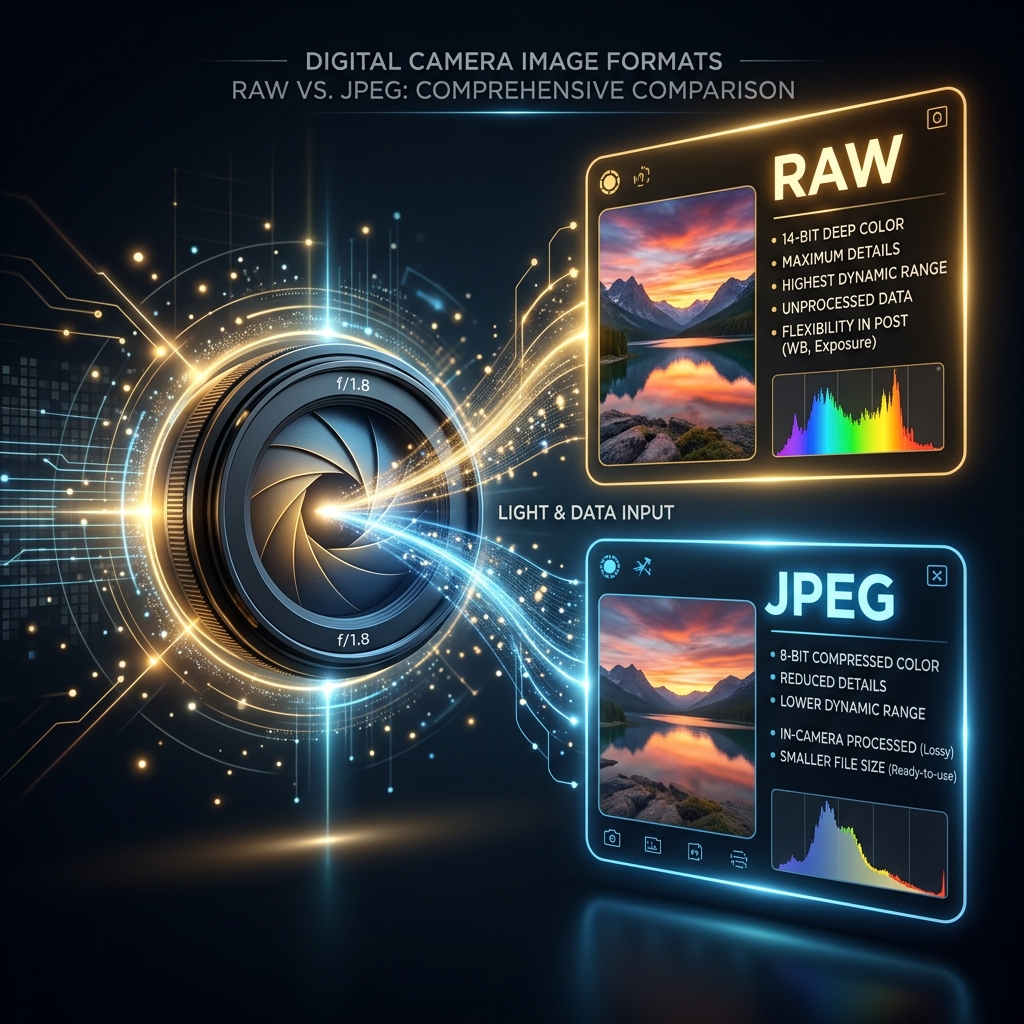
Professional cameras allow you to capture images in either RAW or JPEG formats. While JPEG files are compressed and ready to share, RAW files contain uncompressed sensor data. This article explores why photographers shoot in RAW and how to properly prepare and convert these files for the web.
1. What is a RAW File?
A RAW file is the digital equivalent of a film negative. It contains all the uncompressed light and color data captured by your camera's sensor, giving you maximum flexibility during post-processing to adjust exposure, white balance, and highlights.
2. Post-Processing Latitude
Unlike JPEGs (which are 8-bit files), RAW files are usually 14-bit or 16-bit, allowing you to recover dark shadows and bright highlights without introducing color banding.
3. Camera RAW Formats and Coding
Camera RAW files store uncompressed sensor data, allowing photographers to adjust exposure and white balance without losing detail. However, RAW files are too heavy for web pages and must be compressed to JPEG or WebP beforehand.
Because RAW files retain all visual details captured by the sensor, they are ideal for editing. However, uncompressed files are too heavy for digital displays, making conversion to standard web formats like JPEG or WebP necessary for online sharing. Standard camera manufacturers use proprietary extensions for RAW files (e.g., .CR2 for Canon, .NEF for Nikon). Our client-side conversion script parses these header formats, decapsulating dynamic sensor data for immediate layout conversion. These files are often 10 times larger than standard JPEGs, consuming significant storage space. Before sharing photos on portfolios, pre-converting RAW files to optimized WebP format keeps sizes low while retaining fine detail.
Since RAW files write uncompressed pixel matrices directly, they also contain extensive metadata tables. This includes details like lens geometry, focal lengths, camera sensor coordinates, and proprietary EXIF parameters. Stripping these metadata sets during conversion reduces file weight significantly, optimizing visual files for speedy web delivery.
4. Converting RAW Files to Web-Ready Formats
To convert RAW photos, use local decoders to parse sensor metadata, drawing pixels on canvas for JPEG/WebP export. This local processing keeps files secure and runs entirely inside your browser memory context.
Using browser-based decoders allows you to convert photographic files without sending them to third-party servers. The script processes coordinates on canvas, letting you adjust parameters like quality and resolution locally before saving, guaranteeing complete data privacy.
Additionally, pre-converting files locally bypasses cloud file conversion latency. Standard converter platforms force you to upload large RAW files, which consume significant bandwidth. Our serverless utility processes files directly inside browser tabs, saving data and maintaining security.
5. Core Web Vitals and LCP Optimization
Optimizing photographic files directly improves Core Web Vitals. Compressing images under 100KB speeds up page loading. Pre-scaling files to exact display dimensions also keeps Cumulative Layout Shift (CLS) at zero.
Large photographic files delay LCP paint benchmarks, which can lower search rankings. Compressing images and defining dimensions reserves layout space, keeping CLS at zero and ensuring fast load times on mobile viewports, improving site accessibility.
6. The Security Architecture of Local Client-Side Processing
Unlike traditional online image utilities that require uploading private assets to cloud servers, TinyImagefy performs all file calculations directly inside the user's browser runtime memory. By utilizing modern web APIs such as the HTML5 Canvas API, the File Reader API, and WebAssembly (WASM) modules, the website parses binary image streams locally. This serverless execution model eliminates transmission overhead, making it impossible for malicious entities or database leaks to compromise your personal documents, photography portfolio, or sensitive ID scans. All operations execute strictly within the local browser sandbox, providing enterprise-grade security for everyday workflows.
7. Compliance and Regulatory Benefits of Serverless Tools
Processing media assets locally aligns perfectly with strict international data protection regulations, including the General Data Protection Regulation (GDPR) in Europe and the California Consumer Privacy Act (CCPA) in the United States. Since no image files, EXIF headers, or metadata profiles are uploaded, stored, or processed on remote server arrays, TinyImagefy acts as a passive container. This means businesses, developers, and photographers can sanitize their visual assets, strip GPS coordinates, or crop passport photos without worrying about data processing agreements or regulatory compliance issues. Keeping your files offline is the ultimate way to maintain data sovereignty in a hyper-connected digital landscape.
Frequently Asked Questions
Yes — 100% free, unlimited, no signup. All tools work forever at no cost.
Never. Everything runs in your browser. Your files never leave your device.
JPG, PNG, WebP, AVIF, HEIC, BMP, GIF, SVG, TIFF, and PDF — across 30+ tools.
Yes — works perfectly on iPhone, Android, tablet, and desktop browsers.
The TinyImagefy team builds privacy-first browser tools for image processing. All tools run 100% locally — no uploads, no servers, no tracking. We've helped millions of users compress, convert, and edit images safely since 2024.
About Us →