Demystifying Color Models: RGB, CMYK, HEX, and HSL Explained
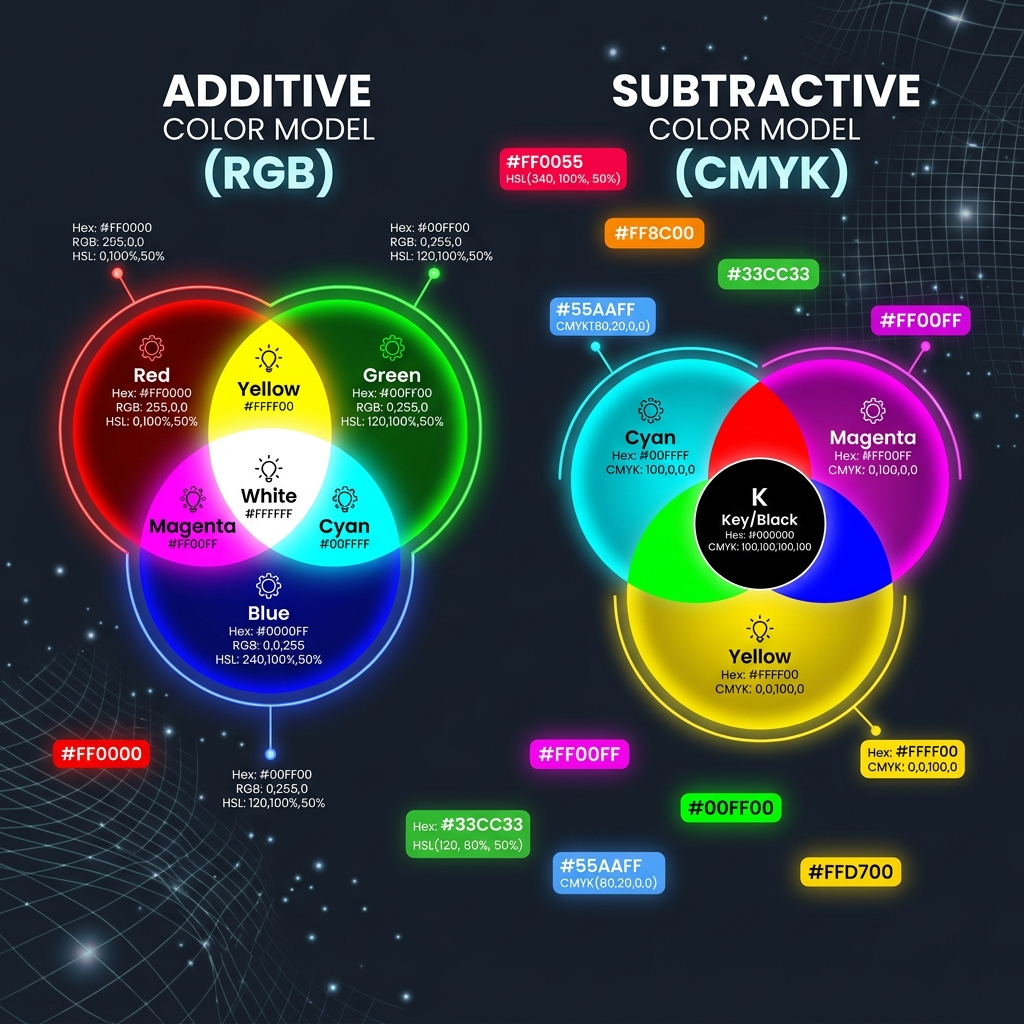
Working with digital images requires a clear understanding of color models. Using the wrong color space can result in washed-out colors or poor print quality. This guide breaks down the RGB, CMYK, HEX, and HSL color models, explaining how they work and when to use them.
1. RGB (Red, Green, Blue) - The Digital Standard
RGB is an additive color model designed for digital screens. It combines red, green, and blue light in different intensities to display colors on your monitor, phone, or TV.
2. CMYK (Cyan, Magenta, Yellow, Key/Black) - The Print Standard
CMYK is a subtractive color model designed for physical printing. It subtracts brightness from a white background by overlaying ink, making it essential to convert your designs to CMYK before sending them to a printer.
3. Web Colors: HEX and HSL Demystified
HEX codes are a hexadecimal representation of the RGB color space. Written as a six-digit string prefixed with a hash mark, the code represents Red, Green, and Blue intensity values ranging from 00 to FF. For example, #FFFFFF represents pure white, while #FF0000 represents pure red. HSL (Hue, Saturation, Lightness) represents a more intuitive color model for developers. Hue represents the color angle on a color wheel (0 to 360 degrees), Saturation represents color purity (0% to 100%), and Lightness represents brightness (0% to 100%). Modifying colors in HSL is much easier than modifying RGB or HEX, as you can easily darken or lighten a shade by tweaking the lightness parameter.
For instance, in modern CSS design, using HSL allows developers to declare primary color tokens that can dynamically adapt to dark mode layouts. By adjusting the lightness value via CSS variables (e.g., changing from HSL(220, 90%, 50%) to HSL(220, 90%, 15%)), you can modify UI states like hover effects, focus outlines, and border shadows without defining entirely new color codes. This modular approach streamlines stylesheets and reduces the overall CSS payload size, enhancing page load times.
4. Color Conversion and Quantization in Browser Engines
When browser engines render images, they convert color space models on the fly to match the display’s profile. For example, rendering PNGs on a canvas requires converting byte streams into a 32-bit RGBA bitmap array. In compression utilities, color quantization reduces the number of unique colors in an image. Lossy PNG compressors analyze colors and group similar shades together, reducing the palette size from millions to a maximum of 256 colors. This quantization process minimizes the file payload while maintaining color accuracy, making the image load faster on web layouts.
This is critical for web applications utilizing large graphics. When a canvas draws an image, it allocates memory based on the dimensions and color depth. An uncompressed 8-bit RGBA image requires 4 bytes of memory per pixel. By applying compression and color quantization, we reduce both the storage footprint on disk and the memory consumption during runtime rendering. Developers must balance color depth and quantization thresholds to prevent visible banding in gradients, ensuring optimal loading speeds without sacrificing fidelity.
5. Selecting the Correct Color Spaces for Digital and Print Work
Always use the sRGB profile for web design and digital display layouts to ensure colors look consistent across screens. If you are preparing files for commercial printing presses, convert your color space to CMYK beforehand. CMYK is a subtractive color model based on Cyan, Magenta, Yellow, and Key (black) inks. Converting digital RGB files to CMYK causes a slight shift in colors since printing inks cannot reproduce the high-vibrancy neon hues of a backlit display. Pre-converting color spaces prevents unexpected shifts during production.
When an image is exported for print, ICC profiles are embedded within the metadata to define how printing equipment should translate the pixel colors. For web use, these embedded ICC profiles add unnecessary bytes to the image file size. Professional web optimization tools strip out these print-specific profiles, retaining only the standard sRGB flag. This ensures that the file loads as fast as possible on browsers while displaying accurately on modern screens, minimizing load latency.
6. The Security Architecture of Local Client-Side Processing
Unlike traditional online image utilities that require uploading private assets to cloud servers, TinyImagefy performs all file calculations directly inside the user's browser runtime memory. By utilizing modern web APIs such as the HTML5 Canvas API, the File Reader API, and WebAssembly (WASM) modules, the website parses binary image streams locally. This serverless execution model eliminates transmission overhead, making it impossible for malicious entities or database leaks to compromise your personal documents, photography portfolio, or sensitive ID scans. All operations execute strictly within the local browser sandbox, providing enterprise-grade security for everyday workflows.
7. Compliance and Regulatory Benefits of Serverless Tools
Processing media assets locally aligns perfectly with strict international data protection regulations, including the General Data Protection Regulation (GDPR) in Europe and the California Consumer Privacy Act (CCPA) in the United States. Since no image files, EXIF headers, or metadata profiles are uploaded, stored, or processed on remote server arrays, TinyImagefy acts as a passive container. This means businesses, developers, and photographers can sanitize their visual assets, strip GPS coordinates, or crop passport photos without worrying about data processing agreements or regulatory compliance issues. Keeping your files offline is the ultimate way to maintain data sovereignty in a hyper-connected digital landscape.
Frequently Asked Questions
Yes — 100% free, unlimited, no signup. All tools work forever at no cost.
Never. Everything runs in your browser. Your files never leave your device.
JPG, PNG, WebP, AVIF, HEIC, BMP, GIF, SVG, TIFF, and PDF — across 30+ tools.
Yes — works perfectly on iPhone, Android, tablet, and desktop browsers.
The TinyImagefy team builds privacy-first browser tools for image processing. All tools run 100% locally — no uploads, no servers, no tracking. We've helped millions of users compress, convert, and edit images safely since 2024.
About Us →