How to Resize Photos for Visa & Passport Applications
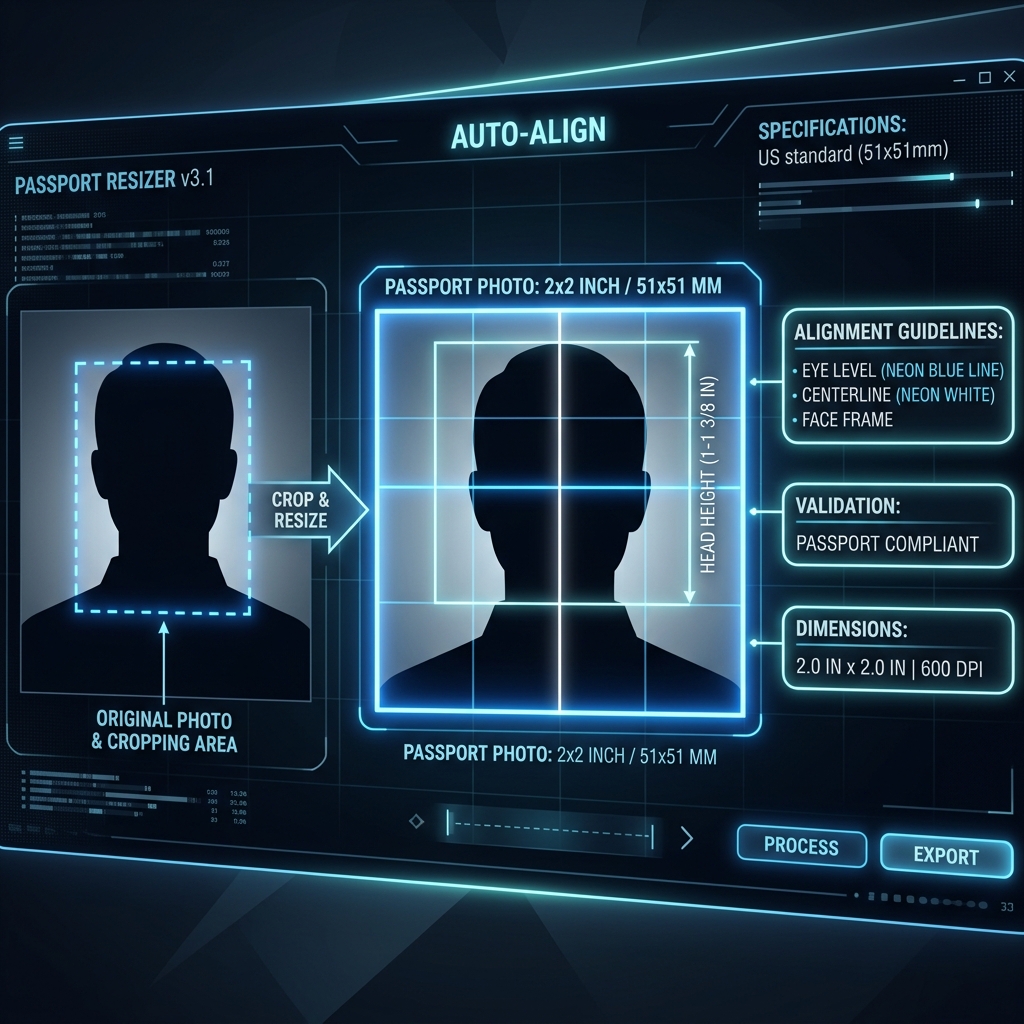
Official portals enforce extremely strict guidelines for digital passport photographs and visa attachments. A single millimeter deviation, bad head height proportion, or incorrect file size can lead to automatic application rejection. Read this guide to master the parameters for global photo submissions.
👉 Try our image resizer — free, no upload, works in your browser instantly.
1. Key Sizing Standards by Region
Different regions require different aspect ratios and physical dimensions. The most common standards are:
- United States (DS-160, Diversity Visa): Requires a square 2x2 inches (51x51 mm) format. The digital image must be exactly **600x600 pixels** (minimum) to **1200x1200 pixels** (maximum), and the file weight must not exceed **240 KB**.
- Schengen Visa (Europe): Enforces a rectangular 35x45 mm size. The head height must cover between 70% to 80% of the vertical frame (roughly 32mm to 36mm from chin to crown).
- India (Passport, OCI, Pan Card): Commonly requests 51x51 mm (2x2 inches) for OCI cards, and 35x35 mm or 35x45 mm for domestic forms. The file size limits are often highly restrictive, capping files at strictly **20 KB** or **50 KB**.
2. Head Alignment & Margins (US Passport Standard)
When cropping your visa photograph, align the camera view using these rules:
- Eye Height: The distance from the bottom edge of the photo to the center of your eyes should be between 56% to 69% of the total height.
- Head Height: The vertical length of your head (from chin to top hair crown) must measure between 50% to 69% of the total photo height.
3. Government Guidelines and Dimension Constraints
Official photo specifications vary by application portal. The US visa requires a 2x2 inch photo under 240KB, while the Indian Aadhaar portal requires a 3.5x4.5cm photo under 20KB. Pre-configuring crop ratios and size limits automatically helps prevent online application rejections.
Official agencies enforce strict rules on photo dimensions and file sizes to ensure compatibility with facial recognition systems. Our resizer includes predefined settings for various portals, making it easy to crop and compress your photos to meet requirements. Additionally, if a photo exceeds size limitations, portals will reject the upload. By adjusting the output compression settings, you can force the file size to remain below the limit, ensuring compliance.
4. Centering and Face Guides Alignment
For official photo approval, capture photos with even lighting and a clear background. Position the camera at eye level and align your head within the guide. Use our shift and scale sliders to adjust head positioning before downloading.
Improper head alignment is a common reason for application rejection. Stand about three feet from the camera to avoid distortion, and keep your expression neutral. Our overlay guide helps center facial features, ensuring compliance with official specifications, allowing you to crop alignment markers accurately without human errors.
5. Safe Client-Side Passport Formatting
Our portal resizers process your portrait images client-side, ensuring complete data security. Canvas encoders adjust quality parameters and resolutions locally to meet size constraints, allowing you to optimize photos safely without cloud uploads.
Because passport photos contain sensitive personal data, uploading them to public servers poses security risks. Our serverless architecture runs entirely within your browser, ensuring that your ID photos remain offline. This protects your data privacy while generating compliant files, giving you peace of mind throughout the application cycle.
6. The Security Architecture of Local Client-Side Processing
Unlike traditional online image utilities that require uploading private assets to cloud servers, TinyImagefy performs all file calculations directly inside the user's browser runtime memory. By utilizing modern web APIs such as the HTML5 Canvas API, the File Reader API, and WebAssembly (WASM) modules, the website parses binary image streams locally. This serverless execution model eliminates transmission overhead, making it impossible for malicious entities or database leaks to compromise your personal documents, photography portfolio, or sensitive ID scans. All operations execute strictly within the local browser sandbox, providing enterprise-grade security for everyday workflows.
7. Compliance and Regulatory Benefits of Serverless Tools
Processing media assets locally aligns perfectly with strict international data protection regulations, including the General Data Protection Regulation (GDPR) in Europe and the California Consumer Privacy Act (CCPA) in the United States. Since no image files, EXIF headers, or metadata profiles are uploaded, stored, or processed on remote server arrays, TinyImagefy acts as a passive container. This means businesses, developers, and photographers can sanitize their visual assets, strip GPS coordinates, or crop passport photos without worrying about data processing agreements or regulatory compliance issues. Keeping your files offline is the ultimate way to maintain data sovereignty in a hyper-connected digital landscape.
3. Background & Facial Expression Guidelines
Beyond size, ensure your photo conforms to aesthetic requirements:
- Background: Must be plain white or off-white. Use our background removal tool if your home backdrop has shadows or colors.
- Expression: Maintain a neutral facial expression with both eyes open, facing the camera directly. No smiles, frowning, or head tilts are permitted.
- No Glasses: As of recent guidelines, prescription and reading glasses are prohibited in visa photos.
4. Step-by-Step Optimization Workflow
To create a perfect passport image at home:
- Take a photo against a light wall under clear front lighting.
- Use our [Passport Photo Maker](../../passport-photo/index.html) to crop the canvas to a 1:1 square.
- Resize the image dimensions to 600x600 pixels.
- Use our [Compress to 50kb](../../compress-image-to-50kb/index.html) or [Compress to 20kb](../../compress-image-to-20kb/index.html) utility to match your target portal size limits.
Frequently Asked Questions
Yes — 100% free, unlimited, no signup. All tools work forever at no cost.
Never. Everything runs in your browser. Your files never leave your device.
JPG, PNG, WebP, AVIF, HEIC, BMP, GIF, SVG, TIFF, and PDF — across 30+ tools.
Yes — works perfectly on iPhone, Android, tablet, and desktop browsers.
The TinyImagefy team builds privacy-first browser tools for image processing. All tools run 100% locally — no uploads, no servers, no tracking. We've helped millions of users compress, convert, and edit images safely since 2024.
About Us →