How to Print and Create Perfect Passport Photos at Home
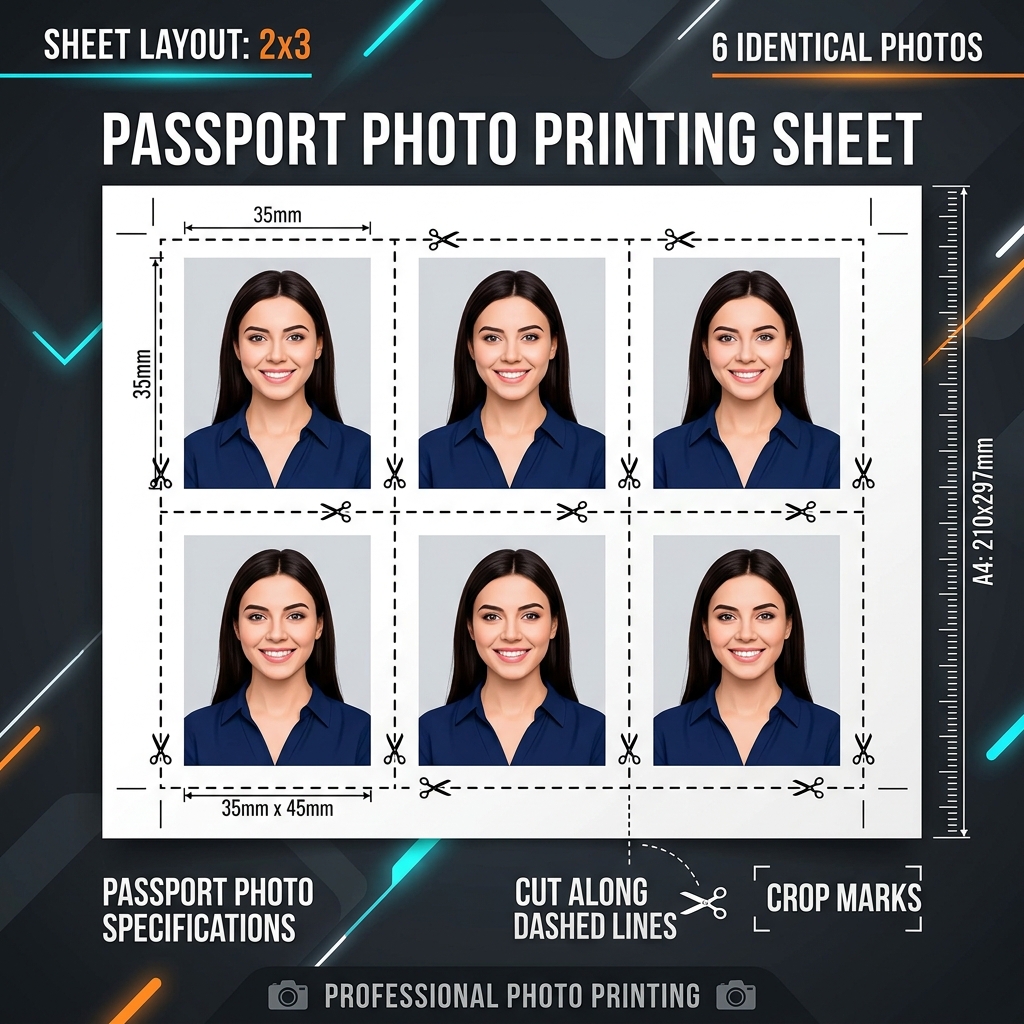
Official passport photos require strict dimensions, background colors, and head alignments. Getting them taken at a retail store is often expensive. This guide explains the official specifications and how to create compliant passport photos at home.
👉 Try our passport photo maker — free, no upload, works in your browser instantly.
1. Sizing and Background Rules
Most passport portals (like the US State Department) require photos to be exactly 2x2 inches (51x51mm) with a solid, plain white background.
2. Biometric Head Alignment
Your head must be centered and measure between 1 and 1.375 inches from the bottom of the chin to the top of the head. Use cropping templates to ensure perfect alignment.
3. Official Sizing Specs and Guidelines
Passport and visa photo specifications vary by country. The US visa requires a 2x2 inch square photo under 240KB; Indian Aadhaar cards require a 3.5x4.5cm photo under 20KB. Our tool provides oval face alignment overlays and background color fills to help you align features and crop to compliant sizes locally.
Government portals enforce strict requirements to ensure facial features are readable. Common rules include setting head height to 50% - 69% of the frame and keeping eye level centered in the grid. Our crop guides outline these dimensions, helping you adjust your photos to meet official requirements. Additionally, correct background colors are mandatory. Most visa applications require a flat, shadowless, light-colored background. Our local tool enables you to key out background details, replacing them with compliant hex codes instantly. This safeguards your portrait files from remote server leaks.
For online application platforms, maintaining precise pixel dimensions is also crucial. For example, a 2x2 inch photo must translate to exactly 600x600 pixels at 300 DPI resolution. Our system processes these calculations behind the scenes, ensuring the file you download is formatted with correct dimensions and resolution headers, eliminating potential platform validation failures.
4. Alignment, Lighting, and Background Formatting
For passport photo approval, ensure even lighting without harsh shadows on the background or face. Position the camera at eye level, stand against a light-colored wall, and use our scale and shift sliders to center your head within the red guide. Replace the background with a pure white canvas before downloading.
Background replacement is a key step, as many government agencies reject photos with dark or textured backgrounds. Our tool uses local segmentation to replace backgrounds with a clean, solid white fill. This ensures your photos meet official guidelines while keeping your files private, preventing them from being cached on third-party cloud servers during photo processing.
Lighting is equally critical; avoid overhead fixtures that cause deep shadows under your eyes or nose. Instead, face a window with natural daylight to illuminate your features evenly. Adjust the brightness and contrast sliders inside our tool to balance exposure details before saving your final output file.
5. Printing Passport Photo Sheets at Home
Once optimized, the tool generates a tiled sheet layout matching standard 4x6 photo paper. Print the file at home using a high-quality photo printer. Set your printer settings to 100% scale without borders to ensure the printed dimensions are exactly compliant with government guidelines.
Using standard glossy photo paper ensures a professional finish. Before printing, double-check that your printer is set to its highest quality mode and that color profiles match standard settings. Printing tiled sheets at home saves time and money compared to using professional print shops, making the entire creation loop highly cost-effective.
6. The Security Architecture of Local Client-Side Processing
Unlike traditional online image utilities that require uploading private assets to cloud servers, TinyImagefy performs all file calculations directly inside the user's browser runtime memory. By utilizing modern web APIs such as the HTML5 Canvas API, the File Reader API, and WebAssembly (WASM) modules, the website parses binary image streams locally. This serverless execution model eliminates transmission overhead, making it impossible for malicious entities or database leaks to compromise your personal documents, photography portfolio, or sensitive ID scans. All operations execute strictly within the local browser sandbox, providing enterprise-grade security for everyday workflows.
7. Compliance and Regulatory Benefits of Serverless Tools
Processing media assets locally aligns perfectly with strict international data protection regulations, including the General Data Protection Regulation (GDPR) in Europe and the California Consumer Privacy Act (CCPA) in the United States. Since no image files, EXIF headers, or metadata profiles are uploaded, stored, or processed on remote server arrays, TinyImagefy acts as a passive container. This means businesses, developers, and photographers can sanitize their visual assets, strip GPS coordinates, or crop passport photos without worrying about data processing agreements or regulatory compliance issues. Keeping your files offline is the ultimate way to maintain data sovereignty in a hyper-connected digital landscape.
Frequently Asked Questions
Yes — 100% free, unlimited, no signup. All tools work forever at no cost.
Never. Everything runs in your browser. Your files never leave your device.
JPG, PNG, WebP, AVIF, HEIC, BMP, GIF, SVG, TIFF, and PDF — across 30+ tools.
Yes — works perfectly on iPhone, Android, tablet, and desktop browsers.
The TinyImagefy team builds privacy-first browser tools for image processing. All tools run 100% locally — no uploads, no servers, no tracking. We've helped millions of users compress, convert, and edit images safely since 2024.
About Us →